LinkedIn: Level Up with Updates!

Tags

LinkedIn is about networking, showcasing, connecting. You spend time getting those connections, don’t let the work go to waste by going dark on them. There are a lot of ways to use the update feed to enhance (or damage, unfortunately) your professional brand so make sure you do.  The key here is to be consistent and steady – don’t flood the feed with 30 updates per day.  People can (and will) hide your updates if they feel like you are spamming them.  Aim for one or two meaningful, professional updates per day if you are job hunting.  If you aren’t actively hunting, a couple per week will work – never let your profile go stale.  Ever.

  1. Add connections.  This is perhaps the easiest way to show on the feed and to get people clicking through.  There will be an upcoming article just on connections, but for now you want to make sure you keep adding them a few at a time.  You can’t control how many people accept your invitation or when, but keep the connecting active.
  2. Update your profile.  Add a course or project.  Update your job description with new achievements.  Publications, speaking engagements, awards – all good fodder for a profile update and you will be keeping yourself current in the process.
  3. Recommendations – request them and give them.  Make sure they are quality recommendations and that they are linked with the correct experience and role.
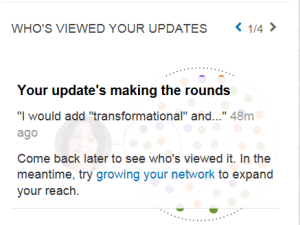
  4. Discussions and links – this is actually harder than it seems and full of pitfalls.  You will show up in the feed if you like or comment on a discussion or link, so think carefully about what it says about you.  If you post or share a link, sayLinkedIn Updates something about why you shared it and why you find it relevant and interesting.  Just clicking share makes you a parrot not a person.  And please, do not like your own link.  Keep an eye on the nifty “Who’s Viewed Your Updates” section and pay attention to the type of links that draw views.
  5. Straight “status” updates – this isn’t Facebook.  Let me repeat that – this isn’t Facebook.  You are speaking at or attending a professional conference?  Update.  You are having a few beers at the ballgame?  No.  No.  No.  Be particularly careful if you have linked to other social media accounts as this will require some vigilance to make sure that only the relevant updates get posted to LinkedIn and that they enhance and advance your image.
  6. Blog posts – same applies as for status updates.  If your blog is linked to your LinkedIn, make sure it is a professional blog and that it is regularly updated and current.  While you may be well known as a political ranter, expert on reptile husbandry or paranormal romance reviewer, unless you are a librarian or herpetologist don’t go there.
  7. Endorsements – so easy and so easy to do incorrectly.  Yes, we all know when you just click the “endorse all four” without stopping and thinking.  Endorse people you know well for things you know they do well.  These also put you on the feed AND send emails to the folks you endorsed, so consider what it says about you if you endorse someone you don’t know for a skill they haven’t used in 10 years.

To add a link, there are a few additional things to know:

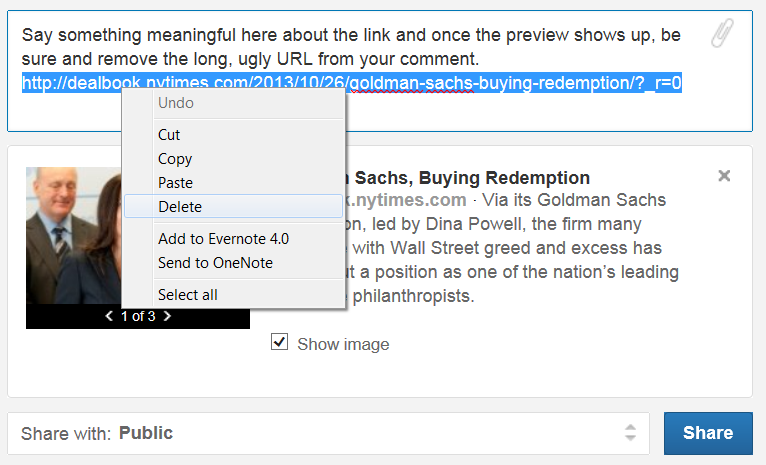
  1. Paste in the URL of the article you want to add.  This will autoenter a preview picture and link with summary.  Once this is there, delete the URL.
  2. Say something about the article.  Why is it interesting?  Why should people take the time to read it?  How does it apply to you?  Keep this BRIEF.  Only the first few lines will show in the feed, so make them count.LinkedIn Update Link
  3. If the preview picture is silly, advertising or irrelevant, remove it (deselect the “Show Image” box) and just post the link.  You do not want to confuse people with a picture of dancing dogs next to an article on an IPO.  If there are more than one picture available you will see a selector bar under the picture to scroll through and choose the best and most relevant.
  4. Choose your audience.  I usually just go with Public, but you can also limit it to connections or add it to social media such as Twitter if the accounts are connected.
Stay fresh, stay current, stay on the feed a reasonable but not excessive amount and you will stay in people’s minds.  It should go without saying, however, don’t start focusing on the feed until you have your picture and your profile looking sharp – the purpose is to get people interested in learning more about you.  If you post a great article and people click through to an informational desert, you have wasted an opportunity.

LinkedIn: I’m Certifiable!

Tags

, ,

Not every occupation is going to have certifications, but if you are in one that does, this is a critical section.  First, don’t list your certifications in your summary, even if you have 987394857435 of them.  Actually especially if you have 98273498381 of them.  You are wasting valuable real estate by doing that and there are much better ways to use your summary.  There’s a section for certifications and it’s set up nicely to let you showcase them.

Don’t list a massive string of certifications after your name either.  If you have one (or maybe two) major industry certifications that define you as an expert in your field, go for it but don’t dilute your name with a bunch of alphabet soup.  In many cases, people won’t know what the heck they are and if they are looking for specific certifications, they will show up in search from the certifications section anyway so you aren’t gaining anything.  Finally, keep in mind that by putting even a couple in with your name, you are defining your brand – make certain that they are how you want to be immediately categorized.

Keep in mind while you are doing this that it is the Certifications section – not the Courses section.  Some people will list courses here but that isn’t appropriate even if they are required to obtain the certification.  Yes, some courses are all that is required to obtain a full certification, that’s fine – but if they are just part of the process, put them in the Courses section.  Overall that will help your profile look more complete anyway and you can update that section as you work towards your certification, giving yourself a bump on the update feed.  Generally, certifications require some sort of exam, test or case study presentation and not just “time served” in a seat.

So, on to the how – start by going to your profile and selecting edit profile.  Scroll down to the Certifications section and click the Add link to the right.  You will get a form that looks like this:

LinkedIn Certifications

Start with the FULL NAME of the certification as it is listed on your certificate – do NOT use acronyms or abbreviations here unless they are well known (and don’t make assumptions that since you know what they mean, others do).  Even if you do include the acronym, do it parenthetically – Project Management Professional (PMP).  There are exceptions for extremely well known certifications where the acronym is actually more recognizable than the full name but go with the parenthetical instead of just the acronym as a rule of thumb.

Move down and enter the certifying authority and license number (if there is one) as it is listed on your certificate – this will actually in most cases give you a drop down so you can select (and therefore provide viewers with a link) to the certifying group.  If yours doesn’t show in the dropdown, don’t panic, just type it in.  Don’t skip this part – WHO certified you is as important as WHAT you are certified to do.  License number may be a specific license number or it may be something more general such as your associated Microsoft Certified Professional number or ITIL candidate number.  This is somewhat optional whereas the certifying authority is not – it will help someone confirm that you do have the certification in some cases, so use your judgment based on your field as to whether that is key information.  This just shows up as text next to the certifying authority.

I consider the certification URL optional as well – if you have a very well known certification in your industry and field it is likely not necessary.  If you have obtained a very specialized certification or one with which people viewing your profile may not be familiar, go ahead and include a link to the OFFICIAL certifying authority’s URL for that qualification.  Don’t link to anything other than the official information, however.  Note that this does not come in as a separate line but rather when someone clicks the name of the certification, it will take them to the link you provided rather than a search of LinkedIn for that certification.

Finally, dates of certification.  You have two options here – date to date or does not expire.  You actually want to update these periodically – some certifications do not expire until they are replaced by a newer certification, some are only good for a certain period, some are eternal.  The first date is obviously the easiest – just enter the month and year the certification was obtained.  If your certification requires renewal, the second date should be the renewal date and you should update this when you renew – not only does it keep your information fresh and show that you are on top of your career, but it will show up on the update feed for visibility when you do this.

So now the big question – what about expired certifications?  Frankly, just like expired meat in the fridge, get rid of them.  Old technology makes you look old and out of date.  Expired certifications can also tell people that you didn’t take the time or make the effort to stay current.  In short, they don’t really add to who you are now and can even undermine your brand.  I know, it hurts – I have more than 15 old certifications that took me substantial time and money to acquire, but no one really cares that I was once certified on a product that is now 4 versions beyond my expertise.  Just let it go and consider it incentive to go do something fresh and new.

So now you should have something like this:

LinkedIn PPO

All done?  Not quite.  See the little up/down arrow to the far right?  This lets you set the order (top to bottom) in which your certifications will be displayed by clicking and dragging it up or down.  You basically have three choices to consider – newest to oldest, by certifying authority or most significant first.  And this may well change as you refine your profile.  The one you want on top is the one that is most important for viewers to see – the one that will be their first impression of your certification focus.  I tend to move the most recent to the top for a while and then sort by certifying authority with most significant certification first.

When you have finished entering your certifications, scroll back to the top and click Done Editing.  One final note – initially you probably want to add all your certifications into the section, but consider adding them one certifying authority at a time over the course of a week or more.  This will put an entry in the update feed and will give each set of certifications their own visibility.  And now, you are officially certifiable!


LinkedIn: And So, In Summary

Tags

Oddly, your summary comes nearly at the beginning of your profile, just after your picture, current information and updates.  Since that is the case, instead of summarizing information that already exists, you want to use this to draw people into reading the rest of your experience and information.  Only only two rules here – don’t repeat information that already exists (and waste valuable real estate) and don’t be boring.  This is your opportunity to tell a story, pique interest in you and inspire them to read further.

Just like with the other areas of your profile, start by reading other people’s summaries.  Do you care to read on?  Do they seem like someone with whom you wish to be connected?  Do you get a feel for the person in the picture?  Some folks use this as an opportunity to list accomplishments, but since there are ample opportunities to do that later, don’t be sucked in by this – UNLESS it is an interesting (brief) story about how that came about.

Don’t use buzzwords or clichéd phrases – nothing puts people to sleep like yet another “experienced transformational leader driving innovation and change”.  Zzzzzzz….  How about “Once upon a time, I was driving through town and noticed a large pothole had developed, requiring me to swerve to miss it.  Looking over at my cellphone, I wondered why no one had developed an app to quickly report road hazards.  So we did.”  NOW I’m interested.  NOW I want to know more about you.  How did it work out?

Don’t list honors or certifications or degrees – again, you have a space for those, you just need to get people to read through to them.  Instead of “accomplished team player certified in blah blah blah” try “While every award is an achievement and I am proud to have been a member of many accomplished teams, the award that sits in the place of honor is the relay medal from [charity race].  Not because we won (we didn’t) but because I learned the importance of each individual’s contributions to the whole.”

What’s important to you?  Who are you as a person?  Why should someone want to hire you, work with you, connect with you?  What do you bring to the table that is unique?  Favorite quote – with why it inspires you?  How did a person, place or event change you?  How did you start on your path and how has it diverged along the way?  What do you find more important – mentoring or being mentored?  This is probably the most difficult part of your profile but the one that will set the tone for meeting your connections, customers, recruiters – it gives them a taste of who you are.

Finally, don’t be long winded – it’s a summary, a snippet, a hint of what’s to come as they continue reading your profile.  If you are passionate about something, don’t say you are passionate – tell a story of your passion, enthusiasm, drive.  Write it out, condense it down, make it grab the reader.  (And be sure to ask those trusted friends to read it once you are done.)

October – Three Months Left

Tags

, , , , ,

Only three months left in 2013.  I suppose I could wait until December and reflect back, but it seems a better idea to reflect back when I can make some adjustments.  Did I accomplish what I wanted to accomplish?  Are there things I still want to accomplish from “way back” at the beginning of the year?  Have things changed?

From a finances standpoint, I still need to dig into my insurance (home, car) costs.  I discovered when the insurance company came to review my house that I was drastically overinsured.  With a 17 year old in the house, my car insurance also went wonky and now that I am going to have to purchase a car this is something that is still on my list.

From a professional standpoint, I didn’t complete the upgrade technical certifications that I had originally wanted but I also discovered that my focus has changed, not only professionally but personally.  I no longer identify myself as the pure geek that I have been for so much of my career but now see myself as process focused.  So mid-year I dropped the emphasis on the technical and application certifications and dedicated myself to ITIL certifications.  I have three tests and two courses remaining until my ITIL expert is achieved and this is a goal I wish to continue.

I’m horribly behind on my reading, that should be an easy one to pick back up as I enjoy it, but I need to make some adjustments – likely I will be adding a commute, so I am investigating audio books as an option as well as adding reading into my daily “to-do” list so that I don’t skip over it for things that seem more important but really are not.

Doing something for 30 days is wonderful and for October I will be taking a picture every day.  The purpose of this is not to get a bunch of amazing pictures, though that would be nice, but to start paying attention to the world around me and perhaps looking at it in different ways.  I’m also going to continue with a TED talk per day as I have found that both enlightening and inspiring.

Fitness and health, I’ve been appallingly slack.  That’s the largest focus of the next three months, difficult as it is going to be now that the lovely weather is ending and the winter cold is seeping in.  Resetting a bit, I’m aiming for simply regular exercise and a diet improvement by creating good habits – October will be 30 days of exercising the dogs, November will be 30 days of “eating in”, December will be 30 days of morning yoga/stretching.

Finally, we started the year planning to redo one room per month.  Instead we completed the guest bathroom (which looks marvelous) and made the front porch inviting and then had the exterior of the house painted – which was such a huge improvement we felt better about the whole place.  From here through December, I’m changing focus a bit to surveying each room and identifying what needs to be done, the cost and effort involved and doing serious decluttering of the remaining “stuff” that isn’t really enhancing our lives.  In the course of this, I’m also going to identify the things we love and use that need repairing, upgrading or replacing.

So, to summarize:

  • Untangle insurance (and put it on the annual checkup list)
  • ITIL Expert certification
  • Catch up on reading
  • Develop and continue good habits in 30 day increments
  • Survey the home improvement needs

Seems doable, let’s see how it goes. 🙂