• About
  • Bucket List
  • Certifications

Cosmic's Corner of the Space Time Continuum

~ because 26 hours a day just isn't enough.

Cosmic's Corner of the Space Time Continuum

Tag Archives: geeky

Do The Math: ITIL Expert Certification

23 Friday Aug 2013

Posted by cosmichomicide in Changes & Progress, Cheapskate, Do The Math, Geeky

≈ Leave a comment

Tags

certifications, geeky, goals

Yeah, this is a niche comparison, but I’m the niche and I need to finish this one out so here goes.  First, ITIL is a service management framework for technology.  It has three levels: Foundation (1 test, no course required), Intermediate (either 4 or 5 tests and courses, depending on the type) and Expert (1 test, 1 course).  So the cheapest you get out is 5 courses, 6 tests.  There are a limited number of players in the online training market (which is the least expensive path) so that’s a good thing for comparing.  There are a myriad of ways to get the required “points” to be eligible for the Expert certification, which adds some complexity.  To figure out what you need, there is a Credit Profiler provided by the official ITIL folks.

Everyone starts with ITIL Foundation which is worth 2 points and the exam can be taken without the course for about $300.  After that there are two Intermediate tracks – lifecycle (5 courses for 3 points each) and capability (4 courses for 4 points each).  You need a total of 17 points from Foundation through Intermediate to be eligible to take the MALC (Managing Across the Life Cycle) course and exam for expert.  Once you subtract out the Foundation points, that’s 15 total points.  Ideally, you would take the ones that most applied to what you are planning to do with the certification while keeping an eye on the cost.  From a pure economic standpoint, you want to hit that 15 points in the least classes possible, so either 4 capability (16 points) or 3 capability and one lifecycle (15 points on the nose).

ITIL Credit Profiler

Yours truly has Foundation for 2 points, RCV (Release, Control and Validation) for 4 points and Service Operation for 3 points.  It’s important to note that there is overlap between the capability and lifecycle courses as well so you have to be careful not to nullify points by taking two sides of the same thing.  There are three degrees of overlap (low, medium and high) so be sure to consider those when choosing courses across different tracks.  Mine have a medium degree of overlap, so I’m good on selecting, but to hit my points on the nose without wasting a course I need two more capability (8 points).  The other option is three more lifecycle (9 points) but the cost is going to be significantly higher to do that.

On to the course and exam costs.  Financially for me, it makes the most sense to take two more capability qualifications – PPO (Planning, Protection & Optimization) and SOA (Service Operations & Agreements).  That said, I’d love to take three lifecycle qualifications – Service Strategy, Service Design and Continual Service Improvement.  So, let’s look at the math using a few different vendors.  The Art of Service offers web based training (self paced with video instructor), Global Knowledge and Pink Elephant offer virtual classroom (online with a live instructor).  We’ll use the AoS “Complete Examination Package” which includes the exam voucher since that is included in the virtual classrooms by the other vendors.  Capability courses are 5 days, Lifecycle are 4 days.  For comparison I’m using the PPO (capability) and CSI (lifecycle) courses:

  • Art of Service (Capability) – $920
  • Art of Service (Lifecycle) – $920
  • Global Knowledge (Capability) – $2995
  • Global Knowledge (Lifecycle) – $2495
  • Pink Elephant (Capability) – $2695
  • Pink Elephant (Lifecycle) – $2495

OK, so pretty significant cost difference, though there are also other considerations – live instructor for questions and a set week of training is a huge plus for many folks and you have to have self discipline to do a web based self paced course (there is a time limit for both finishing the course and taking the exam with AoS).  The instructor leds also have some additional benefits (check the vendor websites) added in for free such as exam guarantees and exam prep sessions.  One disadvantage to instructor led is that you also have to take them when they are scheduled to run.  I’m pretty good at self paced training and study, so I can afford to go for the Art of Service web based training for $920/course.  With two more capability I can be done for $1840 or three lifecycle for $2760.  I should note for folks who are just starting out that all three offer learning pass or package programs for your entire certification you may want to consider.

Once I have my 17 points, the last qualification is Managing Across the Lifecycle (5 days) for 5 points and the Expert certification (22 total points).  Again:

  • Art of Service – $920
  • Global Knowledge – $3295
  • Pink Elephant – $2695

With Art of Service I can buy a 3 pack for $894 per qualification, so I can finish out my remaining intermediates and my expert for $2682 (instead of $2760).  To do online instructor led, the cheapest I can get out without a package would be $8085.

Summary – if you are self disciplined enough to do web based video training within a time limit, AoS is a significant cost savings.  If you prefer a “live” instructor and can set aside a week to attend class online, Pink Elephant is less expensive on capability and MALC but the same as Global Knowledge on lifecycle.  Your choice will likely be limited by the scheduled dates, so plan accordingly.

Note: All prices were taken from the respective websites without any discounts or package prices applied.  They are obviously subject to a.) change, b.) sales and c.) package prices so shop around if you want to do physical or virtual classroom training.
Do The Math: Lightbulbs (Indoor Floods/Tracklights)

22 Thursday Aug 2013

Posted by cosmichomicide in Cheapskate, Do The Math, Geeky, Home

≈ Leave a comment

Tags

geeky, home, money

Starting a new type of post here called “Do the Math”.  Everyone likes to save money and everyone likes to make good decisions, but that often involves math and most people don’t have the time or patience to do the math at the time the decision needs to be made.  On top of that, retailers know that even math nerds don’t haul around all the formulas and when they helpfully calculate for you, it’s never in equivalent amounts – one shampoo will be in cents per ounce, the next in cents per quart, another in liters (just in case you are down with imperial but don’t have a handy conversion to metric tool).  Makes me nuts.  So, I’m gonna pick something and do the math ahead of time so that I (and you) can make that call and feel GOOD about it.

First up – incandescent vs. CFL (compact fluorescent) vs. LED light bulbs.  Now, these guys have a lot of math associated with them and they also have some preference decisions (direction, time to warm up, general aesthetics, heat produced).  I’m sticking with the money numbers here.  So what you need to do the math is:

  • Cost of the bulb (I’m going to use a 65W incandescent equivalent)
  • Lifespan of the bulb (going with 24 hours per day – most aren’t on that long, but hey, it’s the number of hours in a day)
  • Cost of a Kilowatt hour (I’m using $0.11 – you may need to check your power bill if you really want to do your cost instead of a general comparison)
  • Hours in a year – 8760

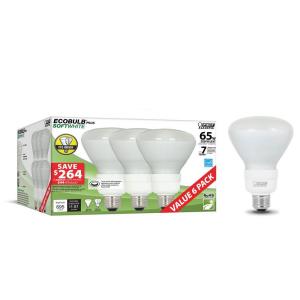
I’m interested in my recessed lighting bulbs since they seem to be burned the most and stay on the longest   Plus, I’ve got a snotload of them – including four that burn constantly.  I’ll take on the “regular bulbs” and “ceiling fan bulbs” in later articles just to see if the numbers are different based on the cost of the bulbs themselves.CFL Bulb

For this post I’m using Home Depot online prices simply because they are easy to find.  Not using dimmable bulbs and I’m going to include the lumens (brightness) since well, light is what light bulbs are all about.

First the standard old school lightbulb (630 lumens).

  • Cost – $4.49/bulb (Philips DuraMax)
  • Lifespan of the bulb (2500 hours or 3.5 bulbs per year)
  • Annual energy cost – $62.64
  • Total cost/year (3.5 bulbs + energy) = 78.35

Yikes!

Now the CFL bulb (what I currently have) (695 lumens)

  • Cost – $3.83/bulb (Feit Electric EcoBulb)
  • Lifespan of the bulb (7665 hours or about 1.15 bulbs per year)
  • Annual energy cost – $14.48
  • Total cost/year (1.15 bulbs + energy) = $18.88

OK, that’s a bit better, but dang – those fixtures are running me nearly $80 per year! (Time to look at timers since the switches are hard to reach, LOL!)

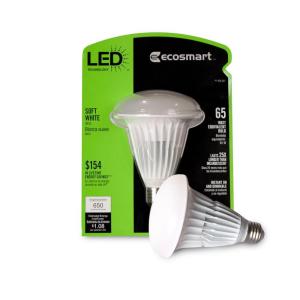
How about the new LED bulbs? (650 lumens)

  • Cost – $15.88/bulb (eeek!) (EcoSmart)
  • Lifespan of the bulb (24966 hours or about .35 bulbs per year)
  • Annual energy cost – $9.04
  • Total cost/year (.35 bulbs + energy) = $14.59

Looks like I’d save another $16 per year per bulb (though I wouldn’t see a savings for about 15 months based on the cost of the bulbs) to go to the LED bulbs though my big gain was dumping the incandescent bulbs.  So how about a “big number”?  Let’s say you have 4 bulbs per room in a 6 room house (obviously adjust – this is just a comparison) that are on 3 hours per day.  (Total cost x 3)

  • Incandescent = $235.05
  • CFL = $151.04
  • LED = $43.77

Looks like it will be worthwhile to start investing in those LED bulbs with the only problem being the 22 year lifespan at 3 hours per day given the *much* higher cost of the bulbs themselves.  Unless you are going to be in your house for 22 years or plan to yank all those bulbs and carry them with you when you move (I may well be cheap enough to do that, LOL!), it’s gonna take a while to realize the full benefit of the cost and “the next great thing” will probably come along.  LED bulbs have dropped in price dramatically since their introduction as have CFLs.  LEDs don’t have the disposal hazards of CFLs, however.

LED BulbLooks like my strategy will be to start slowly replacing those “always on” and “hard to get to” bulbs with LEDs the same way I did with CFLs, hoping that by the time I get to replacing all the bulbs, the price of LEDs will have dropped another tier or two.  It’s also time to start talking to folks about turning out the lights (again).

Summary – if you are still using incandescent bulbs, you are pretty well tossing money away.  CFL bulbs are hazardous waste (bad) but a lot cheaper and last much longer (good).  LED bulbs are not hazardous waste (good), last waaay longer at lower cost but cost substantially more to buy (meaning that it may take a long time to realize the return on mass replacement).

Update:  Today I purchased 7 LED bulbs (4 40W recessed track lights for the 2 display cabinets, 2 flames for the back hall sconces and 1 standard for my bedside table light since I regularly fall asleep with it on and forget to turn it off in the morning) for “always on” lights at a total cost of $101.79.  This changes the numbers just a little as the total was $10 less than the sample bulbs I used in my calculations.  The “always on” cost for the bulbs plus the electric for a year is $165.07 (hence the next purchase of timers) or $13.75/mo.  To run CFLs in those for a year, the cost would be $132.16 (bulb plus energy cost) or 11.03/mo.  The LED bulbs will be paid for in savings at 14 months, leaving me with 31 months of bulb life.   The monthly pure energy savings for 7 bulbs for 31 months will be $3.17/month for a total of $98.27 in savings over the life of the bulbs.  Not too shabby for replacing 7 light bulbs.

It’s Certification Month! (How To Prepare for a Certification Exam)

12 Friday Jul 2013

Posted by cosmichomicide in Geeky

≈ Leave a comment

Tags

certifications, geeky, goals

Yup.  I’ve been slack and I have a stack of certifications that need to be updated to current versions and another stack that I need to complete.  So what better topic for an article than preparation steps.  I’ve taken more than 100 certification exams for more than 8 different vendors over the course of my IT career as well as written exam questions for 2 vendors, so hopefully this might help someone who is facing that first exam.

  1. Figure out which certification you want to achieve.  Go to the vendor’s site and look for “certification paths” or “certification roadmaps”.  This can save you both money and angst since for many vendors there are overlapping exams and exams that pretty much don’t count towards any certification at all.
  2. Make a list of the exams you need to take and any courses or books that are recommended.  Make sure you include the costs of the exams, books and courses in the list.  This can add up quickly and a lot of people don’t realize the total outlay to getting a certification.  Courses can be optional or they may be required, depending on the vendor.  Note whether the course is required and whether there is an online or self study option (these may be cheaper, but you need more self direction using this path).
  3. If courses are required, start looking at training companies, costs and schedules now.  If a course you have to have is only delivered every 6 months locally and is coming up quickly, you may need to adjust your schedule to get that in “out of order”.  Double check that the course aligns with the exam you are planning to take – sometimes all the topics tested aren’t part of the course.
  4. Start a notebook, either paper or virtual (whichever works best for you) to collect all the exam and certification information.  Add your overall list from step one and your cost sheet from step two.  Go to the vendor site for the specific exam and look for a list of “skills measured” (or something similar).  This will be all the topics that will be covered on the exam and (generally) a weighting of which topics will have more questions.  Print this out for your first exam and add it to your notebook.
  5. Set up a study area with a computer and your notebook.  As you take courses or purchase books, put these here as well.  Don’t try to drag things around with you everywhere.  If you are planning to take online courses, invest in a webcam, headset and microphone.  Don’t go cheap on the headset – you’ll be wearing it for long periods.
  6. (Optional) If you have never taken any exams by a particular vendor, see if they provide or recommend any sample questions or sample test providers.  Knowing the format, timing and exam methodology can be the difference between taking an exam once and spending the money twice.  Make sure you know the type of exam and whether you can skip questions, take notes, and the scoring mechanism for questions.  Watch for specials – sample tests providers will periodically have sales or offer bundles for entire certification tracks.
  7. Make sure you have access to the software if you are taking a software exam.  I know this seems common sense, but it is critical that you be able to SEE and DO what you are studying.  Evaluation and demo copies may be fine for this purpose, just make sure that the evaluation period coincides with your study schedule so you don’t run out of evaluation before you are ready to test.
  8. Lay out a study schedule.  Make sure it is reasonable and you can stick to it.  Include any courses in the schedule.  Make sure you leave time at the end to review the skill metrics and go back to the areas where you are still a bit shaky and might need a bit more work.
  9. If you opted for purchasing sample tests, take at least one first.  This should identify your strong and weak areas up front and give you an idea of the areas in which you need to focus.  Don’t skip areas based on this, but use your time wisely.
  10. Schedule your exam.  Yes, schedule it up front.  This gives you a hard and fast date to aim for and will keep you from putting it off and losing motivation.  Nothing like cash on the line to keep you on track.
  11. Take your course or start studying your books.  (Can’t skip this one, I’m afraid).  Take notes as you go on the areas that may need additional review.  Important – if you take a course, take the exam no more than two weeks after you complete the course.  Memories fade.
  12. Exam day minus 1-7 days!  Review any ID requirements or materials needed.  If you are taking the exam online, make sure your computer meets the requirements and run any tests for webcam, headset, microphone, etc.  Take any sample tests and review any areas of weakness.
  13. Exam day!  Don’t cram.  Eat a good breakfast.  Double check that you have any required exam passes, ID, materials, etc.  Use the bathroom before the exam begins.  Keep an eye on the clock.  If you can go back and forth on the exam, do the questions that you know first, return to the ones about which you are unsure.  (Do NOT do this for a dynamic exam – dynamic exams determine the next question based on the answer to the previous one and you can fail quickly by guessing or skipping questions.)  If there is paper available, write down (quickly) any key tables, formulas, etc. that will make answering questions about them faster.  Don’t write down everything, LOL!  And finally, eliminate obvious wrong answers first.  There is only one 100% correct answer, so looking for what isn’t right can be very effective on questions where you aren’t completely sure what is right.
  14. If you pass – yay!  Celebrate and take a week before starting on the next exam study.  If you fail, don’t despair.  Consider it a learning experience and study the exam report.  Likely it will identify the areas where you have a knowledge weakness – schedule a retake (some vendors have free retakes) and focus your next round of study on these areas, making sure to go through the software and any labs or demos related to these.

One word of warning – do NOT use “cheat” or “cram” sites.  The answers are as likely to be wrong as right and in some cases use of these violates the terms of use for the exam.  Do not contribute to these sites as that definitely violates the terms of use.  Keep in mind that the goal is not only to gain the certification but also to gain the skills to be able to do the job.

Good luck!

Spring Cleaning for the Geek Hoarder – Pt. 3

07 Saturday May 2011

Posted by cosmichomicide in Changes & Progress, Geeky, Paperless

≈ Leave a comment

Tags

geeky, goals, paperless

Finally recovered from taxes?  Don’t worry, it’s going to be easier next year – I promise.  This month is going to be much faster, too.

Trash and donate task o’ the month:  Bags and backpacks.  Don’t tell me you don’t have them – every geek conference on the planet gives you a bag.  Vendors give you bags.  Hell, they probably multiply in the closet.  Pull them *all* out.  Every one of them.  Including the backpack/laptop bag you currently use.  Pick five.  Why five?  Your favorite travel backpack and a second runner up.  Your favorite back and forth to work and a second runner up.  And one slot for the “just think it’s really cool” bag.  Now, take the rest of the bags – backpacks go to schools, work style bags to to the homeless shelter or local jobs program.

Nerd purchase(s) of the month:  OK, remember what we did with the USB drives?  Time to buy that external drive or home server with a boatload of storage.  I personally wouldn’t go lower than a terabyte – if you haven’t priced the 1-3 TB drives lately, you might be surprised how cheap it is to have all that glorious storage space.  Take it home, put it in that clean space you cleared up in Part 1 of the series.  Back up *every single* system in your house.  All of them.  And set a regular backup schedule.  Don’t sit around and think “Gosh, I need to delete a lot of crap before… blah, blah” – you have LOTS and LOTS of space.  Oh, and if you are thinking “But, but, I’m going to the Cloud!” (cue sound of angels singing), that’s fine but you are still going to want a physical drive, trust me.

Geeky paper reduction task of the month:   Paperless billing.  All your bills where you possibly can, sign up for this.  While you are there, enable text alerts and e-mail alerts.  If you feel comfortable with it, set up electronic payments for everything you can (but don’t forget to at least look over the bills every month for accuracy).  Set up folders on your shiny new drive to store the electronic copies.  Make sure you store them by year, because you are going to delete them when you don’t need them and it will make it much easier.  There is a link to “how long to keep stuff” in Part 2 of the series, but not something you have to worry about now.   This will go a long way to emptying out your mailbox.

The Rulez:

  • Don’t cheat – you don’t need just a couple more bags.  By the time the five you are keeping wear out, you’ll have been to more conferences.
  • If you do accumulate a new bag or backpack, don’t just toss it in the pile.  If it isn’t better or cooler than your current bags, chuck it.
  • Don’t worry about deleting stuff.  Just back up all your systems.  We’ll worry about electronic clutter much farther down the road.

Spring Cleaning for the Geek Hoarder – Pt. 2

04 Monday Apr 2011

Posted by cosmichomicide in Changes & Progress, Geeky, Paperless

≈ Leave a comment

Tags

geeky, goals, paperless

 Tax month – whee!  It’s not a problem, it’s an opportunity!  No, really.  Time to unload those 10 year old utility bills, receipts for stuff you no longer own, vet bills, registrations & inspections for old vehicles, etc.  I promise this will make next tax year less sucky.

Trash and donate task o’ the month:  Collect all those USB drives you have laying around.  I’m pretty sure that those 500 MB and 1 GB (or higher) drives are doing just that – laying around.  Clear off your stuff, put them in a baggie and donate them to a school (unless you have kids) – virtually all of them require students to have one now.  If you have kids, put a couple away to replace the ones they are going to lose and donate the rest. 

 Nerd purchase(s) of the month:  A shredder and a USB drive.  What, you say?  I just told you to get rid of your USBs?  Right.  Buy yourself a 16 or 32 GB drive with no tops to lose (retractable) and a decent lanyard or key chain ring.  This is a core piece of geek gear.  As for the shredder, never fear, you are getting ready to get a lot of use out of it.  You do not need a heavy duty industrial shredder, but you *do* need a shredder.

 Geeky paper reduction task of the month:  Tax month.  What the heck should you keep and for how long?  Here is a good article from Bankrate on how long to keep financial records.  Don’t worry about the ones you are keeping right now – file them for the moment (use that label maker you bought last month and be *sure* to include the year on the label).  As for the rest – shred ’em and recycle.  If you aren’t sure or it isn’t listed or you just can’t let go of it yet, s’ok – file it and forget it for now.  We’ll get another cut at these later.  At the end of this exercise, you should have a pile of file folders and other miscellaneous paper storing office supplies.  Put these in a box or a (shudder) filing cabinet drawer for the moment – I doubt you will need them again, but who knows?

The Rulez:

  • Is it a record you are required to keep?  If no, shred and recycle.
  • Replace the piles of cheap, freebie or low storage USB drives with one large enough for your needs.
  • Need to keep it?  Label the files consistently and make sure you include the year (ie. 2010 – Medical) and put it in a banker’s box or filing cabinet by year.  For multiyear items (cars, mortgages, etc.) date them by the year of purchase, keep them with the current year.  Remember, you get to shred another year every year!
← Older posts
Newer posts →

Main Stuff

Books Bucket List Changes & Progress Cheapskate Cosmic Questions Do The Math Geeky Health Home LinkedIn Minimalist News and Politics Paperless Stuff that Works TEDTalk Travel Uncategorized Vaping

More Stuff

Blogroll

  • Becoming Minimalist
  • Khan Academy
  • Learn WordPress.com
  • Marc and Angel Hack Life
  • PaperBackSwap
  • Plinky
  • Teach Paperless

books bucket list certifications credit geeky goals health home identity LinkedIn minimize money movies music organize paperbackswap paperless plinky politics quotes TED Talks travel updates vaping

2013 Reading Challenge

2013 Reading Challenge
Karen has completed her goal of reading 65 books in 2013!
hide
65 of 65 (100%)
view books

2012 Reading Challenge

2012 Reading Challenge
Karen has completed her goal of reading 70 books in 2012!
hide
81 of 80 (101%)
view books

2011 Reading Challenge

2011 Reading Challenge
Karen has completed her goal of reading 75 books in 2011!
hide
87 of 75 (115%)
view books

Create a free website or blog at WordPress.com.

Privacy & Cookies: This site uses cookies. By continuing to use this website, you agree to their use.
To find out more, including how to control cookies, see here: Cookie Policy
  • Subscribe Subscribed
    • Cosmic's Corner of the Space Time Continuum
    • Join 42 other subscribers
    • Already have a WordPress.com account? Log in now.
    • Cosmic's Corner of the Space Time Continuum
    • Subscribe Subscribed
    • Sign up
    • Log in
    • Report this content
    • View site in Reader
    • Manage subscriptions
    • Collapse this bar
 

Loading Comments...