• About
  • Bucket List
  • Certifications

Cosmic's Corner of the Space Time Continuum

~ because 26 hours a day just isn't enough.

Cosmic's Corner of the Space Time Continuum

Category Archives: Stuff that Works

TEDTalk: Do One New Thing for 30 Days

16 Monday Sep 2013

Posted by cosmichomicide in Changes & Progress, Geeky, Health, Stuff that Works, TEDTalk

≈ 2 Comments

Tags

geeky, goals, health, TED Talks

I’ve actually been doing this for a while, so imagine my amusement when while watching a TED talk every day for the month of September, I came across this gem:

Watch it and pick something – something little, something you’ve always wanted to try, something good for you, something fun.  I’m thinking for October, I’m going to be taking that daily picture.  Though I’m not going to give up my daily TED talk – and I guess that’s the point, isn’t it?

Household Management With Outlook

28 Wednesday Aug 2013

Posted by cosmichomicide in Geeky, Home, Paperless, Stuff that Works

≈ Leave a comment

Tags

geeky, goals, home, money, organize, paperless

It doesn’t really matter which version of Outlook you have, you can use it for more than email (indeed, this applies to just about every email/calendar/to-do application out there) and keep stuff clean, paid and current.  Years ago I used to keep up with annual stuff (like physicals, vet appointments, car registrations), seasonal stuff (air filter changes, fire alarm batteries) and even weekly and monthly things using either a paper calendar or index cards.  I quit doing that several years ago and switched to using Outlook so I wouldn’t have to think about things until they came due.

I use two features – the calendar for things that occur on specific dates or in certain months and the task list for recurring and one time “just do it” items.  Starting with the task list, just open up the list and start entering things.  Don’t worry about setting them up perfectly yet – you are going to do that as you get to them.  Some example things to add are:

  • Pay bills & deposit checks (I do this twice per month though most of my bills are autopay, I also take a look at the bills just so nothing sneaks by me)
  • Car, people and pet maintenance – oil changes, physicals, vaccinations, registrations and so on
  • Cleaning – daily, weekly, monthly and seasonal.  I do them individually by room or section of the yard so the actual task is smaller and I get to check off more things.
  • Goals and resolutions – a few years back I quit making a huge list of big annual resolutions and make 12 per year, 1 per month.
  • Errands – I have a weekly task for grocery shopping in the body of which I add that week’s list.  When it’s time to go, print the task and you’re off!
  • Monthly bill/investment reviews – this is different from looking at individual items.  Every month I have a different bill type I look at (insurance, phone, cable and so on) and research whether it’s still competitive, useful, new features, features to drop and so on.

Once you have your tasks listed, as you do them the first time, open them up and set how often you want to do them.  There is a “Recurrence” option that lets you set daily, weekly, monthly and annually as well as whether it resets for after you do it or whether it turns red (overdue).  You can also set a time span for that particular task – I use that for things like vacation packing and planning which obviously ends after you finish the trip.  Use help in the options to understand exactly how you are setting things up and don’t get all stressed about it, change and modify as you go until you hit the right balance.
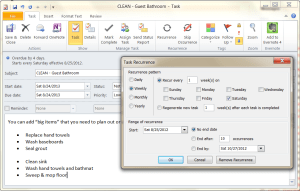
Blog Task

For calendars it’s even easier – if there is a regular date for it, especially things you tend to forget like that dentist appointment in 6 months or which pet is due for which shot when.  There are also recurrence options and alert/alarm options that let you know something is coming up.  Of course, also include those things like Aunt Effie’s birthday and the family reunion (and set the reminder enough in advance to get that gift ordered).

If you are using an online email/calendar/to-do application, you also have the ability to view and take all of this with you on your phone or tablet so you don’t even need to print out that grocery list or try and remember what that other errand was that needed to be done on Tuesday.  It’s right there, you can check it off and bask in the accomplishment!  This also lets you add things on the fly as you are thinking of them.

Finally, a word of warning – don’t become a slave to this.  It’s supposed to help you, not turn you into Polly Perfect.  If you don’t feel like cleaning the den this week (or if it just doesn’t really need it) mark it off and move on.  If you think something needs to be done every day but you never actually get it done every day, move it to every other day or even (gasp) once a week – perhaps you simply don’t have the time or it’s really not that important.  Never be afraid to look at your list and just skip an instance or change the frequency – going outside and enjoying the day with friends or family is always going to be more important and better for you than cleaning the grout.  No, really.  I promise. 🙂


Walking/Running/Hobbling Gear I Love

11 Thursday Jul 2013

Posted by cosmichomicide in Cheapskate, Health, Stuff that Works

≈ Leave a comment

Tags

goals, health, money

I’m not a big “go out and buy a bunch of stuff” person.  I’m actually more of a “haunt the thrift stores until good quality clothes show up” person.  But I never buy second hand shoes (or a few other things because it’s just a bad idea) because they mold and stretch to the wearer and because well – ick.  There are a few other things that don’t show up in thrifts as well.  So, what did I actually buy?

I already have an article on my Merrell barefoot runners so I won’t rehash that here.  I do consider music to be absolutely essential and I can see on my Endomondo graphs where the BPM affects my speed (and distance if my playlist runs out before I do).  So I’ve invested in a running sleeve to hold my phone (Nokia 920), an Endomondo premium account (which has the cool feature of showing you which songs were playing at what points along with tracking distance, speed, personal bests and routes) and my Xbox music pass.  I use JogFM to find playlists and songs with the right BPM for various goals (free).

Other than that and a few pieces of cold weather gear I picked up on sale, it’s a pair of shorts, a good sports bra (I love my UnderArmor, but this is definitely a category for finding the best fit and brand for the individual) and one of my gazillion technical t-shirts.  I do wear a bright, white or reflective item any time I’m out before or after full sun (which is constant in the summer).  And a hat.  The only thing I don’t compromise on at all is the footwear – I track the mileage and replace whether I think my shoes need it or not.  I figure my feet are something I’m going to want to have around and functioning as long as I am so they are worth the investment. 🙂

Creating a Playlist in Windows Phone 8 (with Zune Pass Content)

06 Saturday Jul 2013

Posted by cosmichomicide in Stuff that Works

≈ Leave a comment

Tags

music

First, I love my W8P.  I loved my W7P.  The Nokia 9xx series is terrific.  That said, my experience trying to get my (carefully crafted) walking/running playlists (much if which is Zune Pass music) on my new 920 has been nightmarish and I decided I needed to save it so I wouldn’t have to figure it out again and to possibly help someone else going nuts.  First, I have the “old” Zune Pass – 6 devices (3 computers, 3 phones) and 10 song credits per month.  It’s a great deal, I love it and I’m not giving it up.  But the Zune app doesn’t work with WP8 and the WP8 app for PC (W7) doesn’t sync DRM content or playlists, WMP won’t sync DRM content and the W8 Metro app still isn’t quite there.  So….

Stupid that this should even be necessary, but playlists a.) do NOT import from Zune (and I’m not giving up my 10 credit 6 device legacy Zune account), b.) don’t allow for (get this) editing and c.) practically require a master’s degree in stupid to create.  It is unnecessarily convoluted and awkward.  But hey, it’s possible, just irritating.  I suggest testing out your playlist in the (beloved and sensible) Zune app or Windows Media Player (just change the .zpl extension to .wpl) to make sure you have it right (sigh) first.  Note: If all the songs you want are DRM free, you can create a WMP list and sync it but at this time Zune DRM is apparently not compatible with Xbox Music DRM for some unfathomable reason.

And crud – it appears that, no matter how carefully you add the songs, you are going to get alphabetical.  Le sigh.  Well, the instructions still let you set up a playlist.  I’ll keep following updates and see if there is a way to “fix” the order somehow – perhaps fiddling with WMP…

  1. Clear your History.  It’s easier this way.  Can’t be done “on purpose” in the W8P app, though you can helpfully (accidentally) clear your Now Playing by starting a new song while in the middle of this process or clicking a different album in History, causing you to have to start over.  Get a 3rd party app like Stop Music (free).  There are a bunch of them, pick your favorite.
  2. Go into the Xbox Music app and play the FIRST song you want on your playlist.  You can’t reorder them, so make sure you start with the first one.  (This will make it the only thing in your History and the only thing on your “Now Playing” list.)
  3. Go to Music ==> Songs and click the Select button (looks like a list).
  4. Select the songs you want in the playlist *in order* by clicking the checkbox next to each song.  Be careful, you can’t add or remove later without creating a new playlist.
  5. Click the ellipse (…) and choose “Add to Now Playing”.
  6. Press the up or down volume arrow (gets sillier, doesn’t it) and click the artist in the dropdown.
  7. Click the name of the now playing song under the album art.  (This will take you to the “Now Playing” list – no, there’s not a logical or simple way to do this.)
  8. Make sure all the songs you want are there, otherwise go back and select more – you can’t add later.
  9. Click the Save button and name your playlist.

Can you edit it?  No.  Can you add or delete songs?  No.  Can you sync with anything else you own?  No.

I hear you can do playlists with the new improved W8 metro app – but it still won’t sync your Zune DRM music unless you redownload.  I gotta admit, I would have tried to figure out how to keep my W7P if I’d known – music is a huge deal for me on my phone and this has been a shocking display of poor planning and horrific integration in the name of “better serving me”.  Meh.

Totally Summer Delicious

20 Sunday May 2012

Posted by cosmichomicide in Health, Stuff that Works

≈ Leave a comment

Tags

health

So everyone was going on and on about greek yogurt as the next superfood.  I’m wandering through the grocery store a few weeks ago and see Oikos Greek Yogurt (also Stonyfield Organic) on sale and pick up a random selection.  OMG!  Amazing stuff!  Thick, rich, creamy and filling – I might start living on this stuff if I could find a grocery store that keeps enough in stock. (Coupon available on the site as well.)

← Older posts
Newer posts →

Main Stuff

Books Bucket List Changes & Progress Cheapskate Cosmic Questions Do The Math Geeky Health Home LinkedIn Minimalist News and Politics Paperless Stuff that Works TEDTalk Travel Uncategorized Vaping

More Stuff

Blogroll

  • Becoming Minimalist
  • Khan Academy
  • Learn WordPress.com
  • Marc and Angel Hack Life
  • PaperBackSwap
  • Plinky
  • Teach Paperless

books bucket list certifications credit geeky goals health home identity LinkedIn minimize money movies music organize paperbackswap paperless plinky politics quotes TED Talks travel updates vaping

2013 Reading Challenge

2013 Reading Challenge
Karen has completed her goal of reading 65 books in 2013!
hide
65 of 65 (100%)
view books

2012 Reading Challenge

2012 Reading Challenge
Karen has completed her goal of reading 70 books in 2012!
hide
81 of 80 (101%)
view books

2011 Reading Challenge

2011 Reading Challenge
Karen has completed her goal of reading 75 books in 2011!
hide
87 of 75 (115%)
view books

Create a free website or blog at WordPress.com.

Privacy & Cookies: This site uses cookies. By continuing to use this website, you agree to their use.
To find out more, including how to control cookies, see here: Cookie Policy
  • Subscribe Subscribed
    • Cosmic's Corner of the Space Time Continuum
    • Join 42 other subscribers
    • Already have a WordPress.com account? Log in now.
    • Cosmic's Corner of the Space Time Continuum
    • Subscribe Subscribed
    • Sign up
    • Log in
    • Report this content
    • View site in Reader
    • Manage subscriptions
    • Collapse this bar
 

Loading Comments...