• About
  • Bucket List
  • Certifications

Cosmic's Corner of the Space Time Continuum

~ because 26 hours a day just isn't enough.

Cosmic's Corner of the Space Time Continuum

Tag Archives: goals

TEDTalk: Strike a Pose!

17 Tuesday Sep 2013

Posted by cosmichomicide in Changes & Progress, Health, Stuff that Works, TEDTalk

≈ Leave a comment

Tags

goals, health, TED Talks

Not all the TED talks I’ve watched have immediate practical application (which doesn’t mean they aren’t great, just means you can’t walk out and immediately DO something) but this one not only does, but it works and it is fascinating to observe in meetings and daily life.  Yes, you’ll feel a bit awkward if power postures aren’t your norm (I was surprised, or maybe not, that I normally “spread out” in meetings and such) but I was amazed at the correlation in behavior once I started watching those around me.  Seriously – watch this and try this today.  The folks in the bathroom or who walk past you standing like Wonder Woman in your office before the meeting will get over it and you will feel GREAT. 🙂

TEDTalk: Do One New Thing for 30 Days

16 Monday Sep 2013

Posted by cosmichomicide in Changes & Progress, Geeky, Health, Stuff that Works, TEDTalk

≈ 2 Comments

Tags

geeky, goals, health, TED Talks

I’ve actually been doing this for a while, so imagine my amusement when while watching a TED talk every day for the month of September, I came across this gem:

Watch it and pick something – something little, something you’ve always wanted to try, something good for you, something fun.  I’m thinking for October, I’m going to be taking that daily picture.  Though I’m not going to give up my daily TED talk – and I guess that’s the point, isn’t it?

Household Management With Outlook

28 Wednesday Aug 2013

Posted by cosmichomicide in Geeky, Home, Paperless, Stuff that Works

≈ Leave a comment

Tags

geeky, goals, home, money, organize, paperless

It doesn’t really matter which version of Outlook you have, you can use it for more than email (indeed, this applies to just about every email/calendar/to-do application out there) and keep stuff clean, paid and current.  Years ago I used to keep up with annual stuff (like physicals, vet appointments, car registrations), seasonal stuff (air filter changes, fire alarm batteries) and even weekly and monthly things using either a paper calendar or index cards.  I quit doing that several years ago and switched to using Outlook so I wouldn’t have to think about things until they came due.

I use two features – the calendar for things that occur on specific dates or in certain months and the task list for recurring and one time “just do it” items.  Starting with the task list, just open up the list and start entering things.  Don’t worry about setting them up perfectly yet – you are going to do that as you get to them.  Some example things to add are:

  • Pay bills & deposit checks (I do this twice per month though most of my bills are autopay, I also take a look at the bills just so nothing sneaks by me)
  • Car, people and pet maintenance – oil changes, physicals, vaccinations, registrations and so on
  • Cleaning – daily, weekly, monthly and seasonal.  I do them individually by room or section of the yard so the actual task is smaller and I get to check off more things.
  • Goals and resolutions – a few years back I quit making a huge list of big annual resolutions and make 12 per year, 1 per month.
  • Errands – I have a weekly task for grocery shopping in the body of which I add that week’s list.  When it’s time to go, print the task and you’re off!
  • Monthly bill/investment reviews – this is different from looking at individual items.  Every month I have a different bill type I look at (insurance, phone, cable and so on) and research whether it’s still competitive, useful, new features, features to drop and so on.

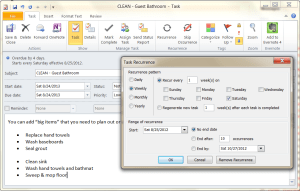
Once you have your tasks listed, as you do them the first time, open them up and set how often you want to do them.  There is a “Recurrence” option that lets you set daily, weekly, monthly and annually as well as whether it resets for after you do it or whether it turns red (overdue).  You can also set a time span for that particular task – I use that for things like vacation packing and planning which obviously ends after you finish the trip.  Use help in the options to understand exactly how you are setting things up and don’t get all stressed about it, change and modify as you go until you hit the right balance.

Blog Task

For calendars it’s even easier – if there is a regular date for it, especially things you tend to forget like that dentist appointment in 6 months or which pet is due for which shot when.  There are also recurrence options and alert/alarm options that let you know something is coming up.  Of course, also include those things like Aunt Effie’s birthday and the family reunion (and set the reminder enough in advance to get that gift ordered).

If you are using an online email/calendar/to-do application, you also have the ability to view and take all of this with you on your phone or tablet so you don’t even need to print out that grocery list or try and remember what that other errand was that needed to be done on Tuesday.  It’s right there, you can check it off and bask in the accomplishment!  This also lets you add things on the fly as you are thinking of them.

Finally, a word of warning – don’t become a slave to this.  It’s supposed to help you, not turn you into Polly Perfect.  If you don’t feel like cleaning the den this week (or if it just doesn’t really need it) mark it off and move on.  If you think something needs to be done every day but you never actually get it done every day, move it to every other day or even (gasp) once a week – perhaps you simply don’t have the time or it’s really not that important.  Never be afraid to look at your list and just skip an instance or change the frequency – going outside and enjoying the day with friends or family is always going to be more important and better for you than cleaning the grout.  No, really.  I promise. 🙂


Do The Math: ITIL Expert Certification

23 Friday Aug 2013

Posted by cosmichomicide in Changes & Progress, Cheapskate, Do The Math, Geeky

≈ Leave a comment

Tags

certifications, geeky, goals

Yeah, this is a niche comparison, but I’m the niche and I need to finish this one out so here goes.  First, ITIL is a service management framework for technology.  It has three levels: Foundation (1 test, no course required), Intermediate (either 4 or 5 tests and courses, depending on the type) and Expert (1 test, 1 course).  So the cheapest you get out is 5 courses, 6 tests.  There are a limited number of players in the online training market (which is the least expensive path) so that’s a good thing for comparing.  There are a myriad of ways to get the required “points” to be eligible for the Expert certification, which adds some complexity.  To figure out what you need, there is a Credit Profiler provided by the official ITIL folks.

Everyone starts with ITIL Foundation which is worth 2 points and the exam can be taken without the course for about $300.  After that there are two Intermediate tracks – lifecycle (5 courses for 3 points each) and capability (4 courses for 4 points each).  You need a total of 17 points from Foundation through Intermediate to be eligible to take the MALC (Managing Across the Life Cycle) course and exam for expert.  Once you subtract out the Foundation points, that’s 15 total points.  Ideally, you would take the ones that most applied to what you are planning to do with the certification while keeping an eye on the cost.  From a pure economic standpoint, you want to hit that 15 points in the least classes possible, so either 4 capability (16 points) or 3 capability and one lifecycle (15 points on the nose).

ITIL Credit Profiler

Yours truly has Foundation for 2 points, RCV (Release, Control and Validation) for 4 points and Service Operation for 3 points.  It’s important to note that there is overlap between the capability and lifecycle courses as well so you have to be careful not to nullify points by taking two sides of the same thing.  There are three degrees of overlap (low, medium and high) so be sure to consider those when choosing courses across different tracks.  Mine have a medium degree of overlap, so I’m good on selecting, but to hit my points on the nose without wasting a course I need two more capability (8 points).  The other option is three more lifecycle (9 points) but the cost is going to be significantly higher to do that.

On to the course and exam costs.  Financially for me, it makes the most sense to take two more capability qualifications – PPO (Planning, Protection & Optimization) and SOA (Service Operations & Agreements).  That said, I’d love to take three lifecycle qualifications – Service Strategy, Service Design and Continual Service Improvement.  So, let’s look at the math using a few different vendors.  The Art of Service offers web based training (self paced with video instructor), Global Knowledge and Pink Elephant offer virtual classroom (online with a live instructor).  We’ll use the AoS “Complete Examination Package” which includes the exam voucher since that is included in the virtual classrooms by the other vendors.  Capability courses are 5 days, Lifecycle are 4 days.  For comparison I’m using the PPO (capability) and CSI (lifecycle) courses:

  • Art of Service (Capability) – $920
  • Art of Service (Lifecycle) – $920
  • Global Knowledge (Capability) – $2995
  • Global Knowledge (Lifecycle) – $2495
  • Pink Elephant (Capability) – $2695
  • Pink Elephant (Lifecycle) – $2495

OK, so pretty significant cost difference, though there are also other considerations – live instructor for questions and a set week of training is a huge plus for many folks and you have to have self discipline to do a web based self paced course (there is a time limit for both finishing the course and taking the exam with AoS).  The instructor leds also have some additional benefits (check the vendor websites) added in for free such as exam guarantees and exam prep sessions.  One disadvantage to instructor led is that you also have to take them when they are scheduled to run.  I’m pretty good at self paced training and study, so I can afford to go for the Art of Service web based training for $920/course.  With two more capability I can be done for $1840 or three lifecycle for $2760.  I should note for folks who are just starting out that all three offer learning pass or package programs for your entire certification you may want to consider.

Once I have my 17 points, the last qualification is Managing Across the Lifecycle (5 days) for 5 points and the Expert certification (22 total points).  Again:

  • Art of Service – $920
  • Global Knowledge – $3295
  • Pink Elephant – $2695

With Art of Service I can buy a 3 pack for $894 per qualification, so I can finish out my remaining intermediates and my expert for $2682 (instead of $2760).  To do online instructor led, the cheapest I can get out without a package would be $8085.

Summary – if you are self disciplined enough to do web based video training within a time limit, AoS is a significant cost savings.  If you prefer a “live” instructor and can set aside a week to attend class online, Pink Elephant is less expensive on capability and MALC but the same as Global Knowledge on lifecycle.  Your choice will likely be limited by the scheduled dates, so plan accordingly.

Note: All prices were taken from the respective websites without any discounts or package prices applied.  They are obviously subject to a.) change, b.) sales and c.) package prices so shop around if you want to do physical or virtual classroom training.

The Painters Are Coming! The Painters Are Coming!

29 Monday Jul 2013

Posted by cosmichomicide in Changes & Progress, Cheapskate, Home

≈ Leave a comment

Tags

goals, home

Yay!  One of the (few) positives about the recession is that my house (which had an estimate of $10K for painting 10 years ago and $6K for painting 5 years ago is now getting estimates in the $3-4K range.  Which is very exciting.  So, going for it.  Painters arrive at 10!  I should note that I have one of those rambling old 4 color Victorians and we have already painted the porch and its gingerbread ourselves (that would have raised the cost by a snotload) and will be doing the porch floor once the exterior is done, but still – this is a huge step in our 2013 house refresh goal.

We were doing the house 1/4 at a time ourselves, scraping and caulking and cleaning as we went, but couldn’t let the opportunity pass to get a clean professional start for a perfectly reasonable price.  Especially since this will let us focus on the interior redo.  There will definitely be pictures on this one. 🙂

← Older posts
Newer posts →

Main Stuff

Books Bucket List Changes & Progress Cheapskate Cosmic Questions Do The Math Geeky Health Home LinkedIn Minimalist News and Politics Paperless Stuff that Works TEDTalk Travel Uncategorized Vaping

More Stuff

Blogroll

  • Becoming Minimalist
  • Khan Academy
  • Learn WordPress.com
  • Marc and Angel Hack Life
  • PaperBackSwap
  • Plinky
  • Teach Paperless

books bucket list certifications credit geeky goals health home identity LinkedIn minimize money movies music organize paperbackswap paperless plinky politics quotes TED Talks travel updates vaping

2013 Reading Challenge

2013 Reading Challenge
Karen has completed her goal of reading 65 books in 2013!
hide
65 of 65 (100%)
view books

2012 Reading Challenge

2012 Reading Challenge
Karen has completed her goal of reading 70 books in 2012!
hide
81 of 80 (101%)
view books

2011 Reading Challenge

2011 Reading Challenge
Karen has completed her goal of reading 75 books in 2011!
hide
87 of 75 (115%)
view books

Create a free website or blog at WordPress.com.

Privacy & Cookies: This site uses cookies. By continuing to use this website, you agree to their use.
To find out more, including how to control cookies, see here: Cookie Policy
  • Subscribe Subscribed
    • Cosmic's Corner of the Space Time Continuum
    • Join 42 other subscribers
    • Already have a WordPress.com account? Log in now.
    • Cosmic's Corner of the Space Time Continuum
    • Subscribe Subscribed
    • Sign up
    • Log in
    • Report this content
    • View site in Reader
    • Manage subscriptions
    • Collapse this bar
 

Loading Comments...